

|
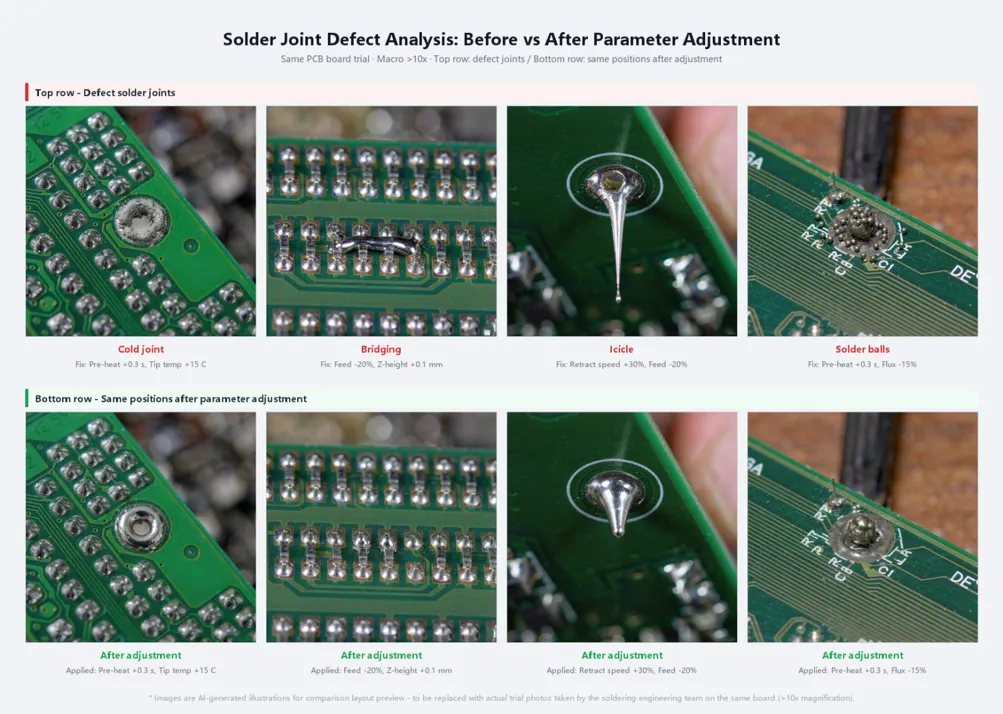
Short answer: Most robotic soldering defects trace back to four settings, not to the robot itself: tip temperature and heat recovery, the timing and amount of wire feed, dwell time on the joint, and tip condition. Cold joints mean too little heat reached the pad. Bridging and icicles mean too much solder or a poor exit path. Solder balls usually mean flux spattering from wire fed onto an overheated tip. |
A soldering robot repeats exactly what it is told. That is its strength, and it is also why a bad parameter turns into a bad joint on every board. When a robot produces cold joints, bridges or solder balls, the fix is almost never to "make the machine better". It is to find which of a small set of settings does not match the joint. This guide goes defect by defect, then explains the four settings behind them and ends with a short start-of-shift checklist your technicians can use on any soldering robot.
Why a robot can solder worse than an operator
A skilled operator watches the joint. If the solder does not flow, they hold the iron a little longer or add a touch more wire. A robot does not watch. It runs the same temperature, feed and dwell time on every point unless the program says otherwise.
The problem shows up when one program is applied to joints with very different thermal mass. A thin signal pin heats up in a fraction of a second. A pin tied to a large ground plane or a heavy terminal pulls heat away from the tip as fast as it arrives. One setting cannot suit both. If it suits the ground pad, the small pin overheats and the flux burns. If it suits the small pin, the ground pad ends up as a cold joint.
That is why the first step in any troubleshooting is to look at which joints fail, not only how many. If the defects cluster on large pads, heavy leads or one corner of the board, the cause is heat balance, not randomness.
Defect quick-reference table
Use this table as a first pass. Change one parameter at a time and check the result on a few boards before changing the next.
|
Defect |
What it looks like |
Most likely cause |
Adjust first |
Then check |
|
Cold joint |
Dull, grainy surface; solder sits on the pad or lead without a smooth fillet |
Not enough heat reached the joint; tip recovers too slowly on large pads |
Pre-heat time before feeding, then tip temperature |
Tip condition, tip size versus pad size, ground-plane connection |
|
Bridging |
Solder connects two neighbouring pins or pads |
Too much solder; tip leaves the joint in the wrong direction |
Wire feed amount, then exit path and speed |
Pin pitch versus tip width; drag speed on headers |
|
Icicles / spikes |
Sharp point of solder pulled up from the joint |
Flux exhausted before the tip lifts; tip lifts too slowly or too cold |
Dwell time after feed, lift speed |
Flux content of the wire, tip temperature |
|
Solder balls |
Small spheres of solder around the joint or on the board |
Wire fed onto an overheated tip; flux boils and spatters |
Feed point (onto the joint, not the tip), then temperature |
Feed speed, moisture or contamination in the wire |
|
Excess solder / blob |
Convex joint that hides the lead outline |
Feed amount set for a larger joint; program copied from another point |
Feed length per joint |
Wire diameter versus pad size |
|
Lifted pad |
Pad partly separated from the laminate |
Too much heat or pressure for too long; tip pressing on the pad |
Dwell time, Z height |
Fixture support under the pad; temperature setpoint |
|
Dark flux residue |
Brown or black burnt residue around the joint |
Tip too hot for the flux; too long at temperature |
Tip temperature |
Wire flux type and its recommended range |
On trial boards, the three defects we see most often are cold joints on ground pads, bridging on pin headers and solder balls from feeding wire onto the tip.
Tip temperature: why the setpoint is not the joint temperature
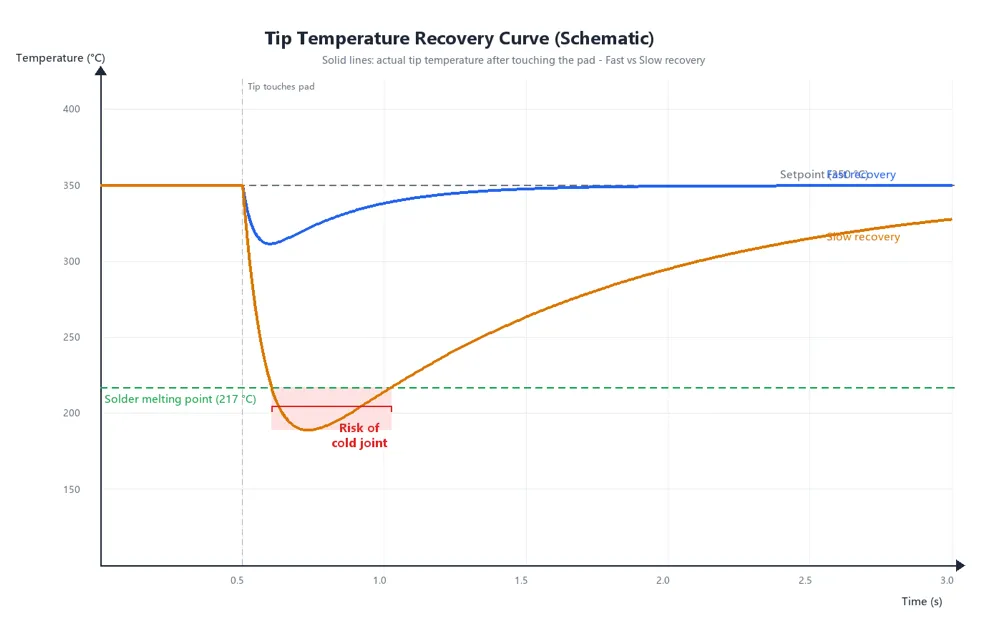
The number on the controller is the temperature of the heater or tip at rest. The joint never reaches that number. When the tip touches a pad, heat flows into the copper and the tip temperature drops. What matters is how far it drops and how quickly the heater brings it back. This is called heat recovery, and on a robot it matters more than the maximum temperature.
A slow-recovering tip on a large pad gives a classic cold joint, even with a high setpoint. Raising the setpoint to compensate often makes things worse elsewhere: the small pins now overheat, the flux burns and the tip oxidises faster. A better order is:
• Match the tip to the joint. A larger contact area moves more heat into the pad without raising the setpoint.
• Add pre-heat time on heavy joints, so the tip warms the pad before any wire arrives.
• Only then raise the temperature, and only for the points that need it. Good soldering robots let you set parameters per joint instead of per program.
As a starting point, many lines run lead-free SAC alloys (melting at about 217–221 °C) at a tip setpoint around 330–380 °C, and tin-lead Sn63/Pb37 (melting at 183 °C) around 300–340 °C. These are starting points only. The solder wire and flux manufacturer's data sheet is the authority for your material.
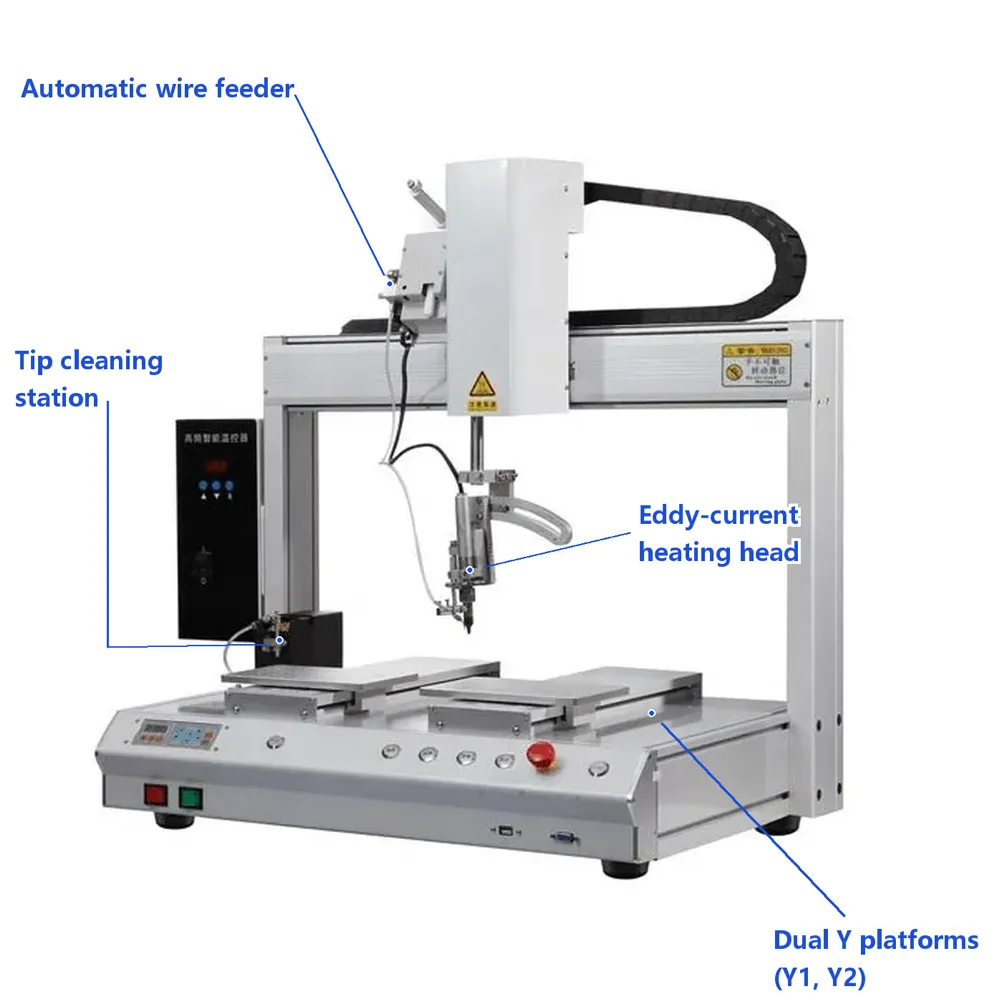
Heater design affects recovery. Our XH-AS4002Y 5-axis soldering robot uses high-frequency eddy-current heating with automatic temperature compensation and an alarm for abnormal temperature, with a setting range of 0–500 °C (per product page). The heater on our three-axis automated soldering machine is rated at 150 W and is listed as reaching 300 °C in about 5 seconds (per product page).
|
Check the tip with a tip thermometer at the start of every shift and write the reading next to the setpoint. A gap that grows week by week is an early warning of a worn tip or a failing heater, long before it shows up as cold joints. |
Wire feed: when, where and how much
Most solder balls and many bridges come from the wire feed, not the temperature. Three questions decide the result.
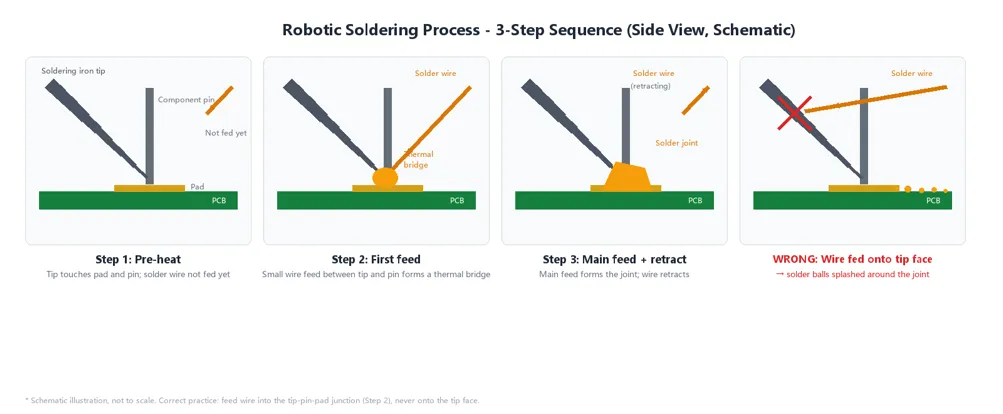
When. Feed after the tip has touched the joint and pre-heated it. Wire fed at the same moment the tip lands melts on the tip instead of on the joint, and the flux burns before it can clean the pad.
Where. Aim the wire at the joint, between the tip and the lead or pad, not onto the tip face. Wire that lands on a very hot tip boils its flux and throws small spheres of solder across the board.
How much. Feed length decides fillet size. Many engineers use a two-stage feed: a small first feed to form a heat bridge between tip and joint, a short pause, then the main feed. The first feed improves heat transfer; the second builds the fillet. A short retract at the end helps prevent the wire from sticking.
Wire diameter should follow the joint size. A wire that is too thick for a small pad overfeeds; one that is too thin for a large terminal needs a long feed and keeps the tip on the joint longer than necessary.
|
Joint type |
Typical starting wire diameter |
Notes |
|
Small pads, fine-pitch pins |
0.3–0.5 mm |
Keeps feed volume controllable; watch for bridging |
|
Standard through-hole leads, connector pins |
0.6–0.8 mm |
The most common range for PCBA back-end soldering |
|
Wire-to-board joints, larger terminals |
0.8–1.2 mm |
Pre-tin stranded wire first |
|
Heavy terminals, large ground pads |
1.2–1.6 mm |
Combine with a larger tip and pre-heat time |
These ranges are guidelines; verify them on your board. Our soldering robots accept solder wire from Ø0.3 to 1.6 mm (per product page), which covers all four rows.
Spot, drag or shake soldering?
Most soldering robots offer more than one motion mode. Choosing the right one for each joint type removes a whole group of defects.
|
Joint type |
Recommended mode |
Watch out for |
|
Single through-hole lead or pad |
Spot soldering |
Pre-heat time on leads tied to ground planes |
|
Row of pins: pin headers, connectors, FFC |
Drag soldering |
Drag speed and exit direction; slow down at the last pin to avoid bridging |
|
Joints with poor wetting or oxidised leads |
Shake soldering (small oscillation) |
Do not use it to hide a solderability problem |
|
Mixed board with heavy and light joints |
Spot soldering with per-joint parameters |
Copying one point's settings to the whole board |
The XH-AS4002Y supports spot, drag and shake soldering, and parameters can be set for each solder joint individually (per product page). That last feature is what makes a mixed board manageable: the ground pad gets a longer pre-heat and more wire, the signal pin next to it gets less.
Tip life: the hidden cost of robotic soldering
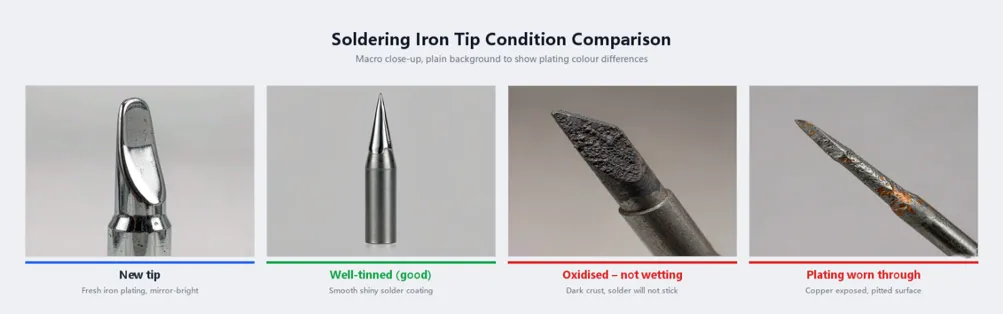
A robot uses its tip far more intensively than an operator does. A tip that stops wetting ("does not take solder") causes cold joints and icicles across the whole board. The usual causes are:
• Idling hot without solder on the tip. The plating oxidises quickly when the tip waits between boards at full temperature.
• A setpoint higher than needed. Every extra degree speeds up oxidation and flux charring.
• Cleaning that is too rare or too aggressive. Too rare lets residue build up. Too aggressive wears through the plating.
• Flux type. Some highly active fluxes clean well but attack the tip faster.
Set automatic cleaning by joint count, not by time, and adjust it after looking at the tip under magnification. Our robots clean the tip automatically; the cleaning method (brush, air blow or both) depends on the model and configuration.
A 10-minute start-of-shift checklist
Most of the defects above are caught before the first board if the technician runs the same short routine every shift:
1. Measure the tip temperature with a tip thermometer and log it next to the setpoint.
2. Check the tip under magnification: shiny and tinned, no black spots, no worn plating.
3. Empty and check the cleaning station; confirm the brush or air blow works.
4. Check the wire feed tube: no kinks, wire runs freely, enough wire on the reel.
5. Confirm the wire-shortage or wire-break alarm (if fitted) is active.
6. Check fixture locating pins and the board seat; remove solder splashes and flux.
7. Load the correct program for the board and confirm the revision.
8. Solder the first board, inspect every joint under magnification and sign it off before running production.
|
Keep one "golden board" soldered with the approved program. Comparing the first board of the shift with it takes one minute and catches drift that a checklist does not. |
What a soldering robot cannot fix
A robot makes a good process repeatable. It does not repair a weak one. If pads are too small for the lead, if a through-hole is tied to a large copper plane without thermal relief, or if component leads have poor solderability, no parameter set will give consistent joints. In those cases, the fix is in the board design or the incoming material.
For how a finished joint should look, use an acceptance standard rather than opinion. IPC-A-610, Acceptability of Electronic Assemblies, defines acceptable, process-indicator and defect conditions for solder joints in three product classes, and many customers write it into their quality requirements.
If you want to compare machine types first, start with our overview of automatic soldering machines and the article on the SMD PCB soldering machine.
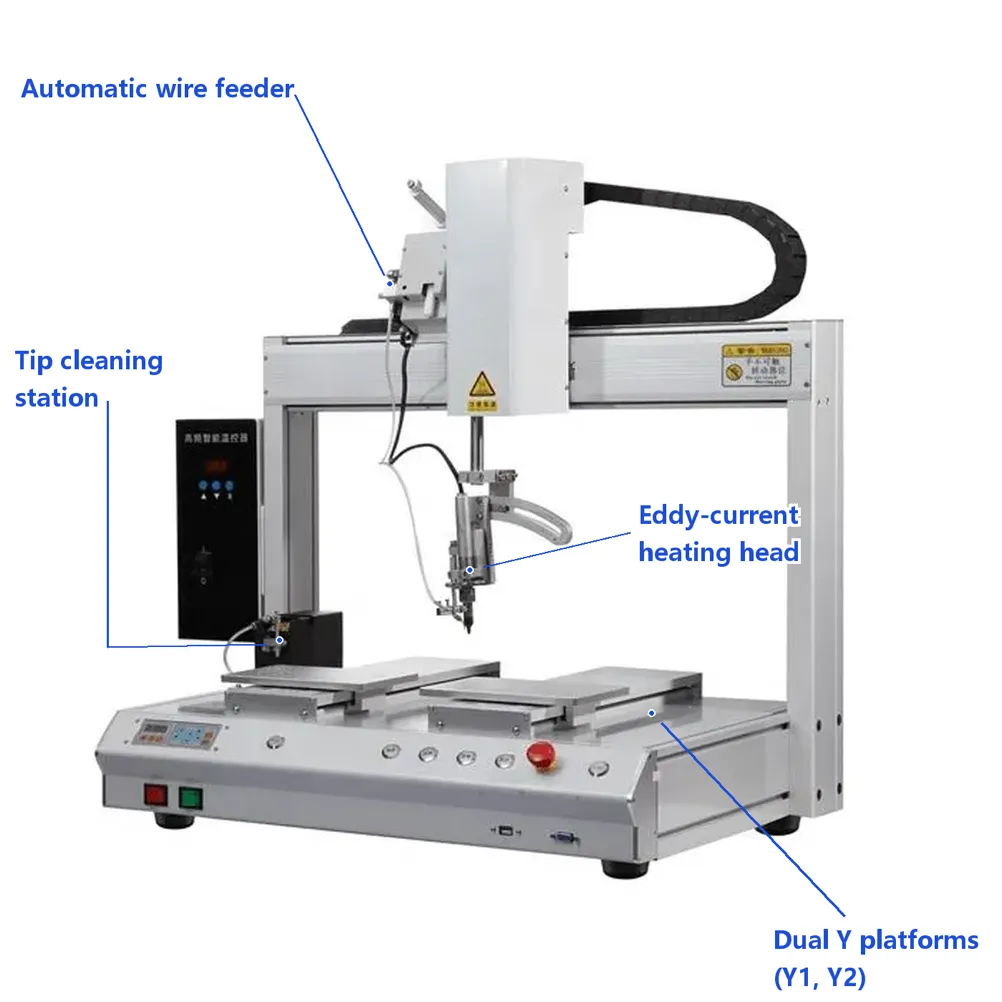
RangJin Intelligent builds soldering robots, glue dispensers, potting machines and screw fastening machines in Dongguan, China. Our XH-AS4002Y is a dual-platform, 5-axis soldering robot: while the operator loads one platform, the robot solders on the other. It has a working area of X 400 mm, Y1 and Y2 400 mm each, Z 120 mm and 360° R rotation, an automatic wire feeder, and a spring-buffered fixture to reduce pressure on the PCB (per product page). Send us a board and your solder wire specification, and we will return joint close-ups and a starting parameter sheet. Contact our soldering team.
FAQ
What temperature should a soldering robot tip be set to for lead-free solder?
For SAC lead-free wire, many lines start at about 330–380 °C at the tip, then adjust per joint. Use the lowest setting that gives a smooth fillet within your dwell time, and check the wire manufacturer's data sheet for its recommended range. Large ground pads usually need more pre-heat time or a larger tip rather than a much higher setpoint.
Why does my automatic soldering machine produce solder balls?
The most common cause is wire fed directly onto an overheated tip, which makes the flux boil and spatter. Move the feed point to the joint, between the tip and the lead, add a short pre-heat before feeding, and lower the temperature if the flux is charring. Moisture or contamination on the wire can cause the same effect.
Is drag soldering suitable for fine-pitch connectors?
Yes, drag soldering is the usual mode for rows of pins such as headers and FFC connectors. It needs a clean, well-tinned tip, a steady drag speed, enough flux and a controlled exit at the last pin. Very fine pitches should be proven on a trial run with the real connector before production.
How often should a soldering robot tip be cleaned or replaced?
Clean by joint count rather than by time, and set the interval by checking the tip under magnification during the first few days. Replace the tip when it no longer wets or the plating is worn through. Logging joints per tip shows you the real tip life on your product and flags process changes early.
Can one soldering program handle both large ground pads and small pins?
Yes, if the robot allows parameters per joint. Give large pads a longer pre-heat, more wire and, if needed, a slightly higher temperature, and keep small pins on a short, cooler cycle. Running one setting for the whole board is the most common reason for cold joints on ground pads and burnt flux on small pins.
Associated Products
You may also be interested in the following products:
Automatic Screw Feeder Machine
Handheld Automatic Screwdriver Machine
6 Axis Automatic Screw Tightening Machine
4 Axis Automatic Screw Fitting Machine
Four Axis Automatic Screw Locking Machine
3 Axis Automatic Screw Assembly Machine
View DetailsFloor Type 3-Station Auto Screw Tightening Machine
Automatic Screw Driving Machine